Posted on September 23, 2005 at 12:35 am
 The features list is really impressive, so just download it and start tweaking your Mac OS X (10.1 to 10.4).
The tool makes sure that preference changes can only affect the current user. You don’t need administrative privileges to use the tool. With this design, it is no problem to use TinkerTool in professional networks where users have restricted permissions. The program will never change any component of the operating system, so the integrity of your system is not put at risk, and there will be no negative effect on system updates.
Posted on September 22, 2005 at 12:16 am
Available now for Mac OS X users, iTunes 5.01 updates iTunes 5 and may fix the problems macswitching.com has reported about.
Read here on Apple discussion forums and here too.
Posted on September 19, 2005 at 9:58 am
An article that makes a lot things more clear about Steve, his past and his future.
At least for those who didn’t know a thing about it…
Read here the full article, or here a short preview.
Posted on September 15, 2005 at 11:15 pm
Andrew Youll really deserves the “MacSwitcher of the month” prize!
He had quite a good tour moving from Windows to Mac OS X and explains it all: software, application switching, Office compatibility and so on…
Read his article here.
Posted on September 15, 2005 at 10:55 pm
BusinessWeek published an article speculating on video iPod, ipodpalace.com reports on this.
A video iPod has been under investigation for a long time, Apple iPod nano announcement looked the right chance but… not this time, it seems.
Read more here.
Posted on September 15, 2005 at 9:47 am
 Nuevos is really small search window which can be customised to perform search with a list of popular search engines, and new ones may be added too!
Latest version is 0.5 (Public Beta 3), Universal Binary (PowerPC and Intel) · Supports 10.3.9 (Panther) and all versions of 10.4 (Tiger).
Downloadable from Nuevos web site.
Posted on September 14, 2005 at 12:05 am
iPodPalace.com reports about some problems encountered by several users using the new iTunes 5.
Check here to know more…
Posted on September 13, 2005 at 5:24 pm
 iPodpalace.com has published a hands-on review on the new iPod nano and the Motorola ROKR iTunes-enables phone.
The article features some early pictures too of the iPod nano, the ROKR and some new accessories and some comments on Apple’s recent announcements.
Read the article on iPodpalace.com and stay tuned for more…
Posted on September 9, 2005 at 12:21 am
There’s too much news to talk about!
The iPod nano has taken the place of the iPod mini (farewell, my dear…), it’s incredibily small and is completely skip free!
A really nice flash-based model, 2- or 4 Gigabytes of memory and a color LCD.
The Motorola ROKR iTunes-enabled Phone holds about 100 songs, just like an iPod shuffle.
iTunes 5 has been announced too: it features a quite new interface, a new search feature and playlist folders.
Available for Mac … and Windows too here.
Read more here.
Posted on September 6, 2005 at 5:40 pm
 What about a nice cup of Mac-Tea? Cuppa is a free software that allows you time exactly for your best tea!
You can customize most aspects in order to get a hot, tasty cup of your favourite tea.
Click get here the free software and feel part of the British Empire!
Posted on September 2, 2005 at 4:22 pm
Apple Online Store has retired the offer to test-drive Mac minis we reported yesterday…
Speculation may arise… any comment?
Read here the article…
Posted on September 1, 2005 at 11:48 am
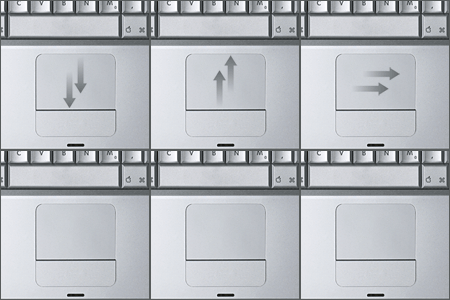
An Open Source Project that aims at the PowerBooks touchpad and behaviour.
As the Sourceforge.net team says what is it:
A project to implement an open source driver for Apple powerbooks. The project was started as an alternative to SideTrack (which isn’t free) and an improvement upon iScroll2. It acheives its advanced features by running the trackpad in what is called `absolute’ mode. This means that the driver can tell exactly what part of the pad your finger is touching. The Apple driver (and iScroll2) both run the pad in `relative’ mode, and while that facilitates a simpler driver because the pad does most of the work, it is very limiting of what you can do.
Read carefully if your Powerbook is supported, though.
Check here for more details and download.


