Posted on November 23, 2005 at 4:35 pm
 You may recall what was Block Notes under OS 8 or OS 9.
Thanks to a japanese programmer, it’s now back under OS X.
You can download it here and it’s Tiger compatible.
It’s really tiny, fast and useful, even as a full text editor.
Have a look at the web page too (japanese language…).
Posted on November 20, 2005 at 5:04 pm
 Ok, you’re so used to Spotlight but what about a search engine written in PHP+CSS+MySQL that strongly resembles Spotlight behaviour?
They’ve done a really good job recreating, with a smooth use of DOM and CSS coding, the Spotlight search box, the searching process in progress and results showing up.
By myself I’m getting a closer look to the code, there’s a lot to learn from: both in CSS and PHP side too…
You can download the whole thing zipped, a mere 56 KB, including PHP code, CSS+DOM and MySQL tables.
Go here to try it out or to BitFlux page where it all started from.
Ah, by the way: it looks like Safari 1.2 is one of the few supported browsers…
Posted on November 18, 2005 at 4:55 pm
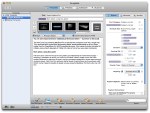 GarageSale is a client application for the eBay online auction system. It allows Mac OS X users to create auctions quickly using an intuitive mac-like interface, integrates with iPhoto and offers WYSIWYG text editing.
Check here for more info on GarageSale.
Posted on November 8, 2005 at 6:28 pm
 As reported in some places as well as on Applenova Forum, Dashcode is expected to be released quite soon.
Has javascript debugging (breakpoints), WYSIWYG editor and more…
Posted on November 6, 2005 at 6:58 pm
A small hint for a big problem, how do you force Spotlight to re-index an entire volume, just like an external FireWire disk?
Do you want to re-index a file or folder—or even an entire volume—for Spotlight?
Just do this:
From the Apple menu, choose System Preferences.
Click Spotlight.
Click the Privacy tab.
Drag a file, a folder, or even an entire volume (your hard drive) to the list.
Remove the item or volume you just added.
Spotlight will re-index the contents of the item you initially dragged to the list
That’s all! The Spotlight icon in the upper right corner will start flashing and reindexing will begin!
Posted on November 6, 2005 at 4:35 pm
Ok, this is no worldwide news, but it’s to me…
It’s really great, with dramatic improvements from my previous Titanium (R.I.P. …)
The new 15″ 1,67 MHz sports a 128 MB ATI 9700 graphics with DVI dual-link ability and an improved 1440 x 960 15″ display, really good and comparable to the pixel resolution of the very first (January 2003) 17″ PowerBook screen, just smaller.
Great battery life, EDR Bluetooth and enhanced SuperDrive: now 8x and Dual-Layer features.
As an added bonus, I’m getting used to the two-fingers touchpad, which allows vertical scrolling just like a wheel mouse.
Uh, by the way, be it it’s the new toy around, but it seems even lighter to carry around…
Recommended.
Posted on November 2, 2005 at 2:00 pm
Just a little after 10.4.3 major update, here comes an update for Airport Extreme users.
Just did it and… nothing weird happened: my non-Apple hotspot works fine with my Airport Extreme card, as it does with my Airport Express.
Check here
Posted on October 28, 2005 at 12:49 am
When it comes to some big-name companies, Macintosh users may have a tough time landing a job.
It’s not just that the business world is dominated by Windows-based computers. It’s because, at a number of large companies, Mac users literally can’t apply.
At American Express, for example, job seekers are greeted with this warning: “At this time, the system does not support Mac environments. If you don’t have access to a PC at home or work, please check out a local public library for Internet access, local Internet cafes, or the nearest government Work Force Center.”
Read here…
Posted on October 24, 2005 at 11:29 pm
S. Wildstrom reports on what is common wisdom among Mac user and just legend elsewhere…
Is Mac OS X immune from viruses? No, but it’s a lot less virus-prone, at least until now…
Thanks to its BSD roots, Apple’s support, community reporting quickly vulnerabilities?
All of them, maybe.
OS X offers inherently better security for several reasons. The most important is that it was designed with relatively little concern for compatibility with earlier versions, while Windows is full of compromises so that it works with older and less secure operating systems.
Check for full story here.
Posted on October 11, 2005 at 12:06 am
BusinessWeek Online reports on what may be more than just a rumor: Oct. 12th may be a great announcement day for Apple.
Apple Computer has summoned journalists and analysts far and wide to an unveiling of “just one more thing.” The e-mailed invitation includes a curtain that looks suspiciously like those found in movie houses, fueling speculation that the Oct. 12 event concerns a souped-up version of the iPod that can play movies.
Read more here.
Posted on October 10, 2005 at 11:21 pm
Read from Apple here and watch the webcast video where Steve introduces the new products here
Posted on September 28, 2005 at 12:04 am
 BusinessWeek argues whether a brand new iMac G5 is worthwhile or not.
Why not just wait the next Intel-based Macs?
Because it’s funny, that’s all.
“So what makes the iMac so cool? The software clearly sells the hardware here.”
Read more here the article.