Posted on February 4, 2006 at 11:10 am
 Airfoil – 2.0.1 – send any audio to AirPort Express
With Airfoil, you can now send any audio right through your AirPort Express. Use RealPlayer, Windows Media Player, Safari, and almost any other application with your AirPort Express. Using Airfoil you can also send audio from widgets and radios like the RadioSHARK, and tweak the audio with Airfoil’s built-in effects.
Airfoil also adds the fantastic ability to send audio to multiple AirPort Express units at once. It’s now possible to send audio all around your house right from your computer. Don’t spend thousands of dollars on expensive solutions to get your audio throughout your home. “Wire” your whole house wirelessly, using AirPort Express units, and give your audio wings with Airfoil.
Now a Universal Binary, with support for Intel Macs
Requirements:
Mac OS X 10.3.9 or higher
AirPort Express hardware
Price: US$ 25.00
Check here for more: http://www.rogueamoeba.com/airfoil/
Posted on January 27, 2006 at 1:28 pm
 CHM Help files are quite common and useful, not just for Windows users.
I know there’s PDF for some sort of universal file format, but sometimes the file source it’s not available or it’s either more browsable in CHM.
I still use a PHP reference guide in CHM since I know where to find things almost everywhere.
Here comes Chmox, from trusted sourceforge, built using Cocoa, WebKit and chmlib.
Version 0.3 dates back to February 2005, but works fine: reads and allows searching/browsing of all CHM files I’ve got.
Posted on January 26, 2006 at 4:13 pm
 The second question is:
What is googol-Choo-Choo3D?
googol-Choo-Choo 3D is a 3D model railroad simulation program. It is easy to make your own layout by dragging and dropping track items, or other items, on your layout. You can see the layout in 3D from driver’s seat of a running train or from several other locations. If you want to create your own trains or structures, you can do it with 3D modeling software and import the file into googol-Choo-Choo 3D.
But the first question is: how many people like playing with train models?
I do!
Both versions available for Mac OS X and Windows XP.
Go and catch the right train! Here: http://www.googolplex.co.jp/index_us.html
Posted on January 26, 2006 at 3:18 pm
It’s a rising question and it’s getting more and more weird answers…
This time News.com tries to put things in the right perspective.
That simple question deserves a simple answer.
But there isn’t one–at least not right now. Reaching the nirvana of running the two most popular desktop operating systems on one machine is a lot harder than you might expect.
I’ll seek for more hints at this issue.
Check here
Posted on January 22, 2006 at 8:04 pm
 Ok, I’ll admit it: I’m a die-hard ebayer… well not actually, I just like to seek for useful (and not that much) stuff.
Retrocomputer, hardware stuff, multimedia devices and, of course, Mac stuff (just look at an iSight offering on eBay…)
Usually I have a Firefox browser tab with my eBay open, but this widget comes in really handy.
Some pluses:
it’s fast
it’s small
it includes eBay from a lot of countries:
Easy eBay supports eBay stores in the Austria, Australia, Belgium (French and Dutch), Canada, China, France, Germany, Italy, the Netherlands, Spain, Taiwan, the United Kingdom and the USA so wherever you are in the world you should be able to find what you’re looking for.
Click here to check Ed’s home page.
Posted on January 11, 2006 at 1:28 am
10.4.4 sports several updates in various areas: from Samba to Safari, from Bluetooth to Dashboard, from security issues to ATI and NVIDIA graphics drivers.
Check here for more info on 10.4.4 and security updates: http://docs.info.apple.com/article.html?artnum=302810-it
,
http://docs.info.apple.com/article.html?artnum=61798-it
Posted on January 11, 2006 at 1:16 am
Astonishing.
The new MacBook Pro redefines the Powerbook line and portable computing as well, the new iMac just gets the iMac even better.
Of course the MacBook Pro gets more flashlights since it’s the very star of the show.
Super CPU with dual core, super graphics with ATI Radeon X1600, built-in iSight and Front Row.
More info to write on in the next days.
More good reasons to switch.
Posted on January 10, 2006 at 12:44 pm
It’s all in the air, tonight…
We’re all waiting for Steve to announce something new at MacWorld.
New Mac minis as full-fledged digital hubs and brand new iBooks are more likely to be announces.
Get ready!
Posted on December 30, 2005 at 1:03 am
 The coder name is quite frightening (‘Murder Thoughts’), but this tiny utility comes in really handy.
I’ve been using it recently as follows.
I had to convert a .DMG (proprietary Apple disc image format) to a .ISO standard format, ready to be burned to CDs/DVDs from any Windows CD burning software (or Apple-based as well).
Damage Isolation (get the name?) does just this.
Using Damage Isolation is easy. Just open the application, and drop a file onto it’s icon in the dock. It doesn’t require any configuration, but you can alter any of the settings you wish by clicking the Preferences button in the main window.
It’s really tiny (just 144 KB), OS X compatible – from 10.2.x up.
Ok, it’s switching back and forth from the Mac, but it adds a great deal of integration with all other platforms.
The coder’s real name is Phil Nelson.
Thanks Phil, great (little) tool.
Get Damage Isolation here.
Posted on December 24, 2005 at 11:47 pm
 It’s XMas time!
Merry Christmas to all Macswitchers!
Best wishes from all of us!
Posted on December 4, 2005 at 3:29 pm
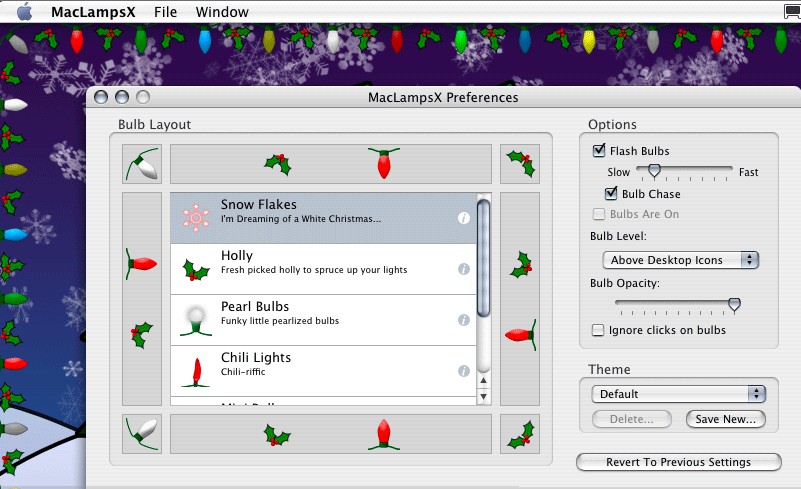 There used to be several utilities for the Mac when Christmas comes, this year you may consider MacLampsX, maybe.
Much like the old Holiday Lights for Mac OS 9, MacLampsX allows multiple desktop enhancements, flash bulbs and special effects.
Ok, a real Christmas tree it’s still better but… doesn’t have a USB port…
Click here for the MacLampsX page or click here to download MacLampsX directly.
Thanks to The Arctic Mac for this Xmas gift!
Posted on November 26, 2005 at 2:00 am
We all love Skype but there’s nothing wrong about looking at some alternative.
Here comes from France, WengoPhone from Openwengo: free, open source and SIP-standard compliant.
Right now it’s just for Windows, but the Mac OS X version is coming anytime soon.
Click here to check OpenWengo for yourself.

