Posted on January 11, 2006 at 1:28 am
10.4.4 sports several updates in various areas: from Samba to Safari, from Bluetooth to Dashboard, from security issues to ATI and NVIDIA graphics drivers.
Check here for more info on 10.4.4 and security updates: http://docs.info.apple.com/article.html?artnum=302810-it
,
http://docs.info.apple.com/article.html?artnum=61798-it
Posted on January 11, 2006 at 1:16 am
Astonishing.
The new MacBook Pro redefines the Powerbook line and portable computing as well, the new iMac just gets the iMac even better.
Of course the MacBook Pro gets more flashlights since it’s the very star of the show.
Super CPU with dual core, super graphics with ATI Radeon X1600, built-in iSight and Front Row.
More info to write on in the next days.
More good reasons to switch.
Posted on December 30, 2005 at 1:03 am
 The coder name is quite frightening (‘Murder Thoughts’), but this tiny utility comes in really handy.
I’ve been using it recently as follows.
I had to convert a .DMG (proprietary Apple disc image format) to a .ISO standard format, ready to be burned to CDs/DVDs from any Windows CD burning software (or Apple-based as well).
Damage Isolation (get the name?) does just this.
Using Damage Isolation is easy. Just open the application, and drop a file onto it’s icon in the dock. It doesn’t require any configuration, but you can alter any of the settings you wish by clicking the Preferences button in the main window.
It’s really tiny (just 144 KB), OS X compatible – from 10.2.x up.
Ok, it’s switching back and forth from the Mac, but it adds a great deal of integration with all other platforms.
The coder’s real name is Phil Nelson.
Thanks Phil, great (little) tool.
Get Damage Isolation here.
Posted on December 24, 2005 at 11:47 pm
 It’s XMas time!
Merry Christmas to all Macswitchers!
Best wishes from all of us!
Posted on December 4, 2005 at 3:29 pm
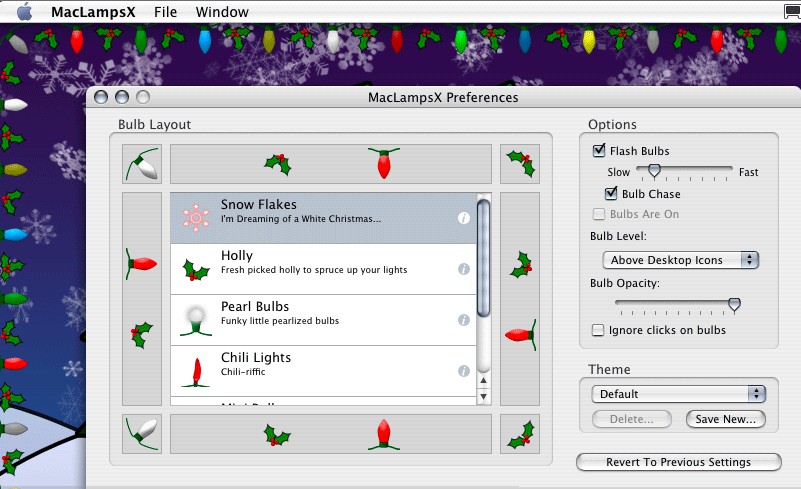 There used to be several utilities for the Mac when Christmas comes, this year you may consider MacLampsX, maybe.
Much like the old Holiday Lights for Mac OS 9, MacLampsX allows multiple desktop enhancements, flash bulbs and special effects.
Ok, a real Christmas tree it’s still better but… doesn’t have a USB port…
Click here for the MacLampsX page or click here to download MacLampsX directly.
Thanks to The Arctic Mac for this Xmas gift!
Posted on November 26, 2005 at 2:00 am
We all love Skype but there’s nothing wrong about looking at some alternative.
Here comes from France, WengoPhone from Openwengo: free, open source and SIP-standard compliant.
Right now it’s just for Windows, but the Mac OS X version is coming anytime soon.
Click here to check OpenWengo for yourself.
Posted on November 23, 2005 at 4:35 pm
 You may recall what was Block Notes under OS 8 or OS 9.
Thanks to a japanese programmer, it’s now back under OS X.
You can download it here and it’s Tiger compatible.
It’s really tiny, fast and useful, even as a full text editor.
Have a look at the web page too (japanese language…).
Posted on November 20, 2005 at 5:04 pm
 Ok, you’re so used to Spotlight but what about a search engine written in PHP+CSS+MySQL that strongly resembles Spotlight behaviour?
They’ve done a really good job recreating, with a smooth use of DOM and CSS coding, the Spotlight search box, the searching process in progress and results showing up.
By myself I’m getting a closer look to the code, there’s a lot to learn from: both in CSS and PHP side too…
You can download the whole thing zipped, a mere 56 KB, including PHP code, CSS+DOM and MySQL tables.
Go here to try it out or to BitFlux page where it all started from.
Ah, by the way: it looks like Safari 1.2 is one of the few supported browsers…
Posted on November 18, 2005 at 4:55 pm
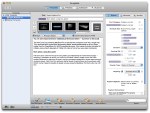 GarageSale is a client application for the eBay online auction system. It allows Mac OS X users to create auctions quickly using an intuitive mac-like interface, integrates with iPhoto and offers WYSIWYG text editing.
Check here for more info on GarageSale.
Posted on November 8, 2005 at 6:28 pm
 As reported in some places as well as on Applenova Forum, Dashcode is expected to be released quite soon.
Has javascript debugging (breakpoints), WYSIWYG editor and more…
Posted on November 6, 2005 at 6:58 pm
A small hint for a big problem, how do you force Spotlight to re-index an entire volume, just like an external FireWire disk?
Do you want to re-index a file or folder—or even an entire volume—for Spotlight?
Just do this:
From the Apple menu, choose System Preferences.
Click Spotlight.
Click the Privacy tab.
Drag a file, a folder, or even an entire volume (your hard drive) to the list.
Remove the item or volume you just added.
Spotlight will re-index the contents of the item you initially dragged to the list
That’s all! The Spotlight icon in the upper right corner will start flashing and reindexing will begin!
Posted on November 6, 2005 at 4:35 pm
Ok, this is no worldwide news, but it’s to me…
It’s really great, with dramatic improvements from my previous Titanium (R.I.P. …)
The new 15″ 1,67 MHz sports a 128 MB ATI 9700 graphics with DVI dual-link ability and an improved 1440 x 960 15″ display, really good and comparable to the pixel resolution of the very first (January 2003) 17″ PowerBook screen, just smaller.
Great battery life, EDR Bluetooth and enhanced SuperDrive: now 8x and Dual-Layer features.
As an added bonus, I’m getting used to the two-fingers touchpad, which allows vertical scrolling just like a wheel mouse.
Uh, by the way, be it it’s the new toy around, but it seems even lighter to carry around…
Recommended.