About

The resource to people switching to the Mac (and to MacLife altogether): Mac OS X integration, Mac-Windows interoperability, iPod and most Macintosh-related topics!

Social Media

RSS Feeds

You are currently browsing the archives for the Mac OS X internet utilities category.

Posted on September 1, 2006 at 6:30 pm

Download videos from Google Video, YouTube into Mac, PC, iPod, PSP & Treo – for free!

A pretty working tool to download & convert videos from YouTube, Google Video and iFilm to your Mac and PC into AVI, FLV and MP4 (iPod & PSP!) and Palm Treos as well!

Every single moment a nice idea comes alive on the web.
This is useful too: a website that enables anyone to convert a video available on one of the most popular video sharing systems around, namely YouTube, Google Video and iFilm, and save it directly to your PC (or Mac!) into three different video formats.

This is done simply starting in two ways from the http://www.googlevideodownload.com/ home page:
– searching on Google Video, Youtube of iFilm or
– copying the video URL directly into the second textbox.
google video conversionThe first way will give you results you’ll be using later.
Let’s see what happens for a simple search: let’s look for guy kawasaki, a well-known guy in the Mac-world and Venture Capitalist guru, among other things.

Clicking on the first link/result we get just brings us to the magic of this site: a page with at least three download links, namely for .FLV (Flash Video), an .AVI compatible with PCs and Macs as well and (great!) .MP4 directly for iPod, Sony’s PSP and more…
The result page should be this bringin up the Guy Kawasaki presentation in several video formats .

The advantage is clear: you can watch videos without downloading/installing flash players or Google Video Player (available for PCs and Macs) and have your favorite videos converted for iPods, PSP and any other portable device as well: for free!

google video conversion
It’s just a matter of downloading them from googlevideodownload.com website (so it’s up to your internet connection speed) and you’ve got a stand-alone copy of these videos on your hard disk.

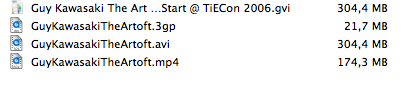
File size matters: the Guy Kawasaki presentation it’s about 300 MB for GVI (Google Video format) and stays the same (same encoding?) in .AVI format; it goes down to 174 MB in .MP4 format.

What to add more?
Palm Treo video playback support!
We still love & use our Treo 650 and, even though it lacks stereo headsets and a huge screen it’s still enough to see some pod/videocasts or to show some friends videos.
Interested? Here’s how we did!

Download the MP4 version of your favorite video and open it with Quicktime 7 Pro (you may try some other free video converters too).
Export video to .3GP, a common cell phones video format, and then copy it onto your Treo.
Our Treo 650 is using a 1 GB Sandisk SD card, so file transfer it’s quite easy this way!
Again, the Guy Kawasaki video shrinks to a mere 22 MB fitting perfectly the SD card and leaving room for a lot of videos.
Check the Treo video playback in this Quicktime or the .MP4 version

As a result we’re able to pass the video on any device: from the Powerbook G4 to Windows XP, to a DiVX player, to an iPod or PSP and to a Treo 650 too!

Kudos to the guys at googlevideodownload.com!

BTW: please keep in mind that some video content may have copyright or stuff like that so check out before sharing them.

Share


Posted on August 2, 2006 at 4:50 pm

Switch to Airport Express: make it clear it’s not for Mac users alone! It’s obvious.

A short (and obvious, I admit it) personal story (much like a hands-on case-study) about really working Mac-switching and Windows interoperability.

I attended a (quite) long business meeting last week in a wonderful hotel.

The meeting room was not so wonderful: no Internet connection and few AC outlets… nice furniture but not so biz-oriented.
I was the only one with a Mac (Powerbook G4 1.67 GHz), all other guys were carrying Win-portables (I still do have an XP box, I confess); the scenario: 10 notebooks, plenty of paper and a Coffee pipeline.

What happened at 10.30 AM was ridicolous: the Excel spreadsheet we were working on has so changed so much from the original (9.30 AM) printed version that we decided to share the (only one) digital version across all participants.
I’ve been told to participate just as a ‘technical viewer’, I had no opportunity to prepare, setup and think a smart solution… before the meeting.

The first solution was to pass it over all other 9 notebooks with USB pendrives.
Thank God, we almost immediately realized it was going to happen several times throughout the day.
Thank Apple (and me) I suggested sharing the Excel file through the obvious: a wireless LAN.
All notebooks had Wi-Fi (mostly were Centrino-equipped) but quite a few guys never used it.

What I did:
– plugged my Airport Express in, just the power plug [no Ethernet/WAN needed 😉 ]
– used Airport Admin to remove (my) usual MAC address filtering and security features so that the AE was completely open and available,
– set up my Powerbook as a FTP server, copying the Excel file in the default FTP directory from the dreaded USB pendrive.

Then, I wrote on a Post-It the FTP address and asked all people to switch their Wi-Fi device on, check that my AE was in the available wireless LANs, log in that address with Internet Explorer (no one using Firefox, sigh).

Just typing

ftp://10.0.0.2/theholyexcelfile.xls

did the magic for all people.

My Powerbook eventually became the pseudo-server of the meeting: the money-and-figures guy moved on it and worked on it (telling me “Wow, it’s a lot like Excel on Windows!”…) the whole day.

Biz-meeting mission accomplished: apart from biz-related results, it was clear to most people that a little white box with an apple on it IS DEFINITELY NOT JUST FOR Mac (OR iPod) users.

Lesson learned:
– biz guys are really accidental notebook users: some never noticed F2 is the ‘edit-key’ in Excel,
– wireless LANs are easy to setup, provided you don’t worry that much about security…
– unlike free meals, Mac-Win interoperability exists,
– always check for Windows and Norton Firewall and, just for the working session, disable it,
– with a USB printer shared through Airport Express, success would be complete!
– Airport Express hasn’t reached a lot of potential users (AKA buyers), most people think a hotspot is a heavy device and cannot come from Apple…
– most people looked at the AE thinking it was an iPod power supply…
– there has to be a better way for biz meetings than sharing paper-digital-paper Excel files,
– I know that collaborative tools for cooperative spreadsheet working are available, but this was a quick-and-not-so-dirty solution!

Remember, just like your parents, you can’t choose biz-meeting people!

Share


Posted on July 26, 2006 at 12:23 am

Skype for Mac OS X (preview version) available now with video support!

skype mac video callIt’s here now! Skype has released, without much fanfare by the way, a preview version with video calls support for Mac OS X.

Just tested it!

Don’t mind the italian language version in the screenshot…

Downloaded it, run it and check for iSight support.
Or… just check a firewire videocamera (the Mini-DV you use for birthdays…) or a bunch of so-and-so supported webcams.
Check here the SourceForge project that has brought us a webcam drivers for Mac OS X.

Now you can talk (it works, right now) and use video with proud Windows users with Skype 2.x.

Download here Skype Preview release: 1.5.0.47.

Share

Posted on April 16, 2006 at 3:43 pm

A Mac OS X for everyone, even Windows users: no installation required!

mac os xChris Kite (along with a cool team) has created a transformation package for Windows XP that makes XP look almost like Mac OS X.

The project’s web site is a masterpiece on itself too.

Check here for this online Mac OS X version!

Share

Posted on March 20, 2006 at 2:40 pm

Witch: a powerful task – and document- switcher for Mac OS X

mac os x task switcher witchI guess you’re all used to do Command-Tab all the time to do task-switching and, if you’re a Windows switcher, you’re still more used to the ALT-Tab keys combination.

Witch, from Peter Maurer, comes in really handy since it allows you not only to switch from one task to another, but to switch from each and every open document under every program running.

An easy way to pass from multiple open documents with the simple touch of a switch.

Witch is Universal Binary and comes for free or a donation via paypal to the author.

Check here for more info & download: http://www.petermaurer.de/nasi.php?section=witch

Share

Posted on March 11, 2006 at 1:06 am

The Citrix Dashboard Widget

Citrix is one of the best remote control tech around for PCs.

Why not putting it in a really useful Widget?

Check here the full story

Share

Posted on February 11, 2006 at 5:36 pm

ATI card accelerator: an article with utility

ati acceleratorDare you?

ATI graphics card are quite widespread on Mac these days and overclocking fans are always trying to squeeze more and more power from their ATI chips.

It’s not clear how much, but a 12% speed increase should be reached without melting your beloved Mac board.

Looks like the download link for the accelerator software is dead, this is the working one.

The full story is available here.

Read carefully everything before trying it! I decline every responsibility about hardware damage, war or any other bad thing that may happen to you or your Mac…

Share

Posted on January 27, 2006 at 1:28 pm

Chmox: a viewer for MS Help CHM (aka Compiled HTML) files on Mac OS X 10.3 using Cocoa, WebKit and chmlib

chmox chm mac os x viewerCHM Help files are quite common and useful, not just for Windows users.
I know there’s PDF for some sort of universal file format, but sometimes the file source it’s not available or it’s either more browsable in CHM.

I still use a PHP reference guide in CHM since I know where to find things almost everywhere.

Here comes Chmox, from trusted sourceforge, built using Cocoa, WebKit and chmlib.
Version 0.3 dates back to February 2005, but works fine: reads and allows searching/browsing of all CHM files I’ve got.

Share

Posted on January 22, 2006 at 8:04 pm

Easy e-bay widget: a must-have for all ebayers!

ebay widgetOk, I’ll admit it: I’m a die-hard ebayer… well not actually, I just like to seek for useful (and not that much) stuff.
Retrocomputer, hardware stuff, multimedia devices and, of course, Mac stuff (just look at an iSight offering on eBay…)

Usually I have a Firefox browser tab with my eBay open, but this widget comes in really handy.

Some pluses:

  • it’s fast
  • it’s small
  • it includes eBay from a lot of countries:

    Easy eBay supports eBay stores in the Austria, Australia, Belgium (French and Dutch), Canada, China, France, Germany, Italy, the Netherlands, Spain, Taiwan, the United Kingdom and the USA so wherever you are in the world you should be able to find what you’re looking for.

    Click here to check Ed’s home page.

  • Share

    Posted on January 11, 2006 at 1:28 am

    Several updates available: 10.4.4, iTunes 6.0.2, Quicktime 7.0.4…

    10.4.4 sports several updates in various areas: from Samba to Safari, from Bluetooth to Dashboard, from security issues to ATI and NVIDIA graphics drivers.

    Check here for more info on 10.4.4 and security updates: http://docs.info.apple.com/article.html?artnum=302810-it
    ,
    http://docs.info.apple.com/article.html?artnum=61798-it

    Share

    Posted on November 26, 2005 at 2:00 am

    Frankly (and french) speaking of VoIP with a Mac: meet Openwengo

    We all love Skype but there’s nothing wrong about looking at some alternative.

    Here comes from France, WengoPhone from Openwengo: free, open source and SIP-standard compliant.

    Right now it’s just for Windows, but the Mac OS X version is coming anytime soon.

    Click here to check OpenWengo for yourself.

    Share

    Posted on November 23, 2005 at 4:35 pm

    MacNote: a quick-and-dirty Block Notes for OS X

    macnote mac os x text editorYou may recall what was Block Notes under OS 8 or OS 9.
    Thanks to a japanese programmer, it’s now back under OS X.

    You can download it here and it’s Tiger compatible.

    It’s really tiny, fast and useful, even as a full text editor.

    Have a look at the web page too (japanese language…).

    Share
